So after fooling around with docker at a coffee shop for about 5 hours, I was able to get my app running in docker with docker-compose!
How I got up and running:
Research: I had seen a lot of different docker flavors out there so I wanted to jot down some notes on what I found each one did from some basic searches:
- docker-compose: running multiple docker containers w/a single source
- docker swarm: a mechanism for clustering docker engines (seems out of scope for what I want at the moment)
- docker hub: a repo (for docker configurations) kind of like github
Along the way, getting up and running, I was trying to keep a few things in mind:
- a lot of the tutorials I saw had django working with postgres, which made sense at larger scale, but for me running sqlite, it seemed like overkill
I was following aspects of the following articles, which I found helpful for different parts (they were django tutorials):
- https://faun.pub/tech-edition-how-to-dockerize-a-django-web-app-elegantly-924c0b83575d
- https://www.honeybadger.io/blog/docker-django-react/
Process
I started by creating a Dockerfile for my backend api (pictured below in quotesdjangoreact) and then a separate one for my frontend (quotesfrontend).
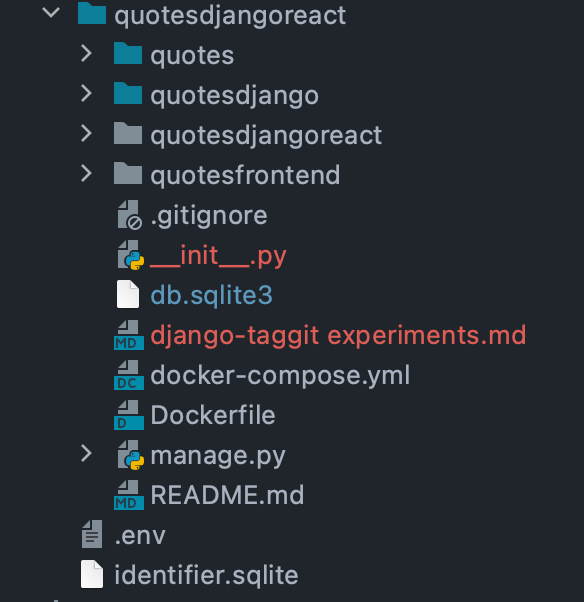
Once I had those two files, it was time for me to create a docker-compose.yml file to bring running those containers together! Here’s what I currently have for my basic setup.
version: '3.8'
services:
  api:
    build: .
    ports:
      - "8000:8000"
    command: python manage.py runserver 0.0.0.0:8000
  web:
    build: ./quotesfrontend
    ports:
      - "3000:3000"
    volumes:
      - ./quotesfrontend:/quotesfrontend
Once I had a docker-compose file written, it was time to try and get the containers up and running! I built and ran docker compose with the following commands:
docker-compose build docker-compose upThe first command built the image and took maybe a minute or so to completely build.
After that, docker-compose run got my two containers running and talking to one another!
Troubleshooting
So along the way, I encountered 3 issues that I needed to solve once I saw the container was up and running.
- Mounts denied
- Connection refused
- Disallowedhost: Invalid http_host header
Error response from daemon: Mounts denied:
The path /quotesdjango is not shared from OS X and is not known to Docker. You can configure shared paths from Docker -> Preferences... -> File Sharing. See https://docs.docker.com/docker-for-mac/osxfs/#namespaces for more info.
1. Mounts denied: It took a while tinkering around with solutions from various links, but eventually the following couple of links helped me get past this one:
- https://stackoverflow.com/questions/45122459/mounts-denied-the-paths-are-not-shared-from-os-x-and-are-not-known-to-docke
- https://medium.com/effy-tech/fixing-the-var-folders-error-in-docker-for-mac-v2-2-3-2a40e776132d
Proxy error: Could not proxy request /api/auth/token/obtain/ from localhost:3000 to http://localhost:8000 (ECONNREFUSED).2. Connection refused: the eventual solution that worked for me was to change the proxy value from “http://localhost:8000” to the name that I was using for my docker-compose yaml: “http://localhost:8000” –> “http://api:8000”
Invalid HTTP_HOST header: 'api:8000'. You may need to add 'api' to ALLOWED_HOSTS3. Disallowedhost: Invalid http_host header: the solution to this problem wasn’t that difficult, but I forgot to update my docker environment so I kept seeing Invalid HTTP_HOST header: ‘localhost:8000’. You may need to add ‘localhost’ to ALLOWED_HOSTS when I knew that I had updated the appropriate value.
Moral of the story: don’t forget to tear down and rebuild your containers when you make configuration changes as sometimes that can be the simple thing you’re forgetting.
These commands can help save headache (not in all scenarios, but definitely in many of my experiences)
- docker-compose down
- docker-compose build
- docker-compose up
My journey with docker is just getting started, but so far, I really like the concept and benefits of containerization!
 Wayne Codes