-
Deploying to prod – Docker pt. 1
It’s been a while since I’ve tried to deploy a web app to production. Honestly, the last time I did this was in a coding bootcamp almost 5 years ago. I’m not really sure what deployment strategies are recommended these days, but after doing some research and talking to a few friends, I think I’ve generally got a direction:
- Containerize with Docker – I don’t have experience with virtualization technology, but I know that in working with larger teams, having containers can be helpful in isolating dependencies and making sure that everyone is developing off of the same set of tech
- Deploy with Kubernetes or ECS – I’m still a little unsure of which approach I’ll take here, but because the app I’m looking to deploy is pretty light, I’m hoping that either option will be pretty straightforward
So far, I’ve downloaded Docker for Desktop and I plan to go through some basic tutorials to learn basic commands.
The app I’m looking to deploy is running locally with the following:-
- Django – backend python framework
- sqlite3 – DB
- Node – frontend server
- React – frontend js framework
Hopefully once I get a grip on Docker, I can utilize Docker Compose, and then by that time, have an idea of what I will use to take my web app live.
My next post will be about working with Docker and where I’ll go from there!
-
A pesky re-rendering problem
I recently incorporated displaying images along with quotes in my web app. Unfortunately, when I stopped to take a closer look at the front end, I was seeing images re-render multiple times because of how react handles rendering content. (If you look closely, you can see images changing seemingly in place)

For context, as my image source, I downloaded nature images from pixabay and put them in a public/images folder. I was randomly choosing what image would be associated with quote on render, which meant that the images would change during every single render (see code below).
<Card style={{ width: '24rem' }}>
    <Card.Img variant="top" src={imgSrc[mapped[Math.floor(Math.random() * imgSrc.length)]]} />
    <Card.Body>
        <Card.Title>{index+1}. "{quote}"</Card.Title>
        <Card.Text>~ {author}</Card.Text>
    </Card.Body>
</Card>
I wasn’t really sure how to sort through debugging this re-render. At first, I dug into using useCallback and React.memo to control the re-rendering, but I couldn’t quite wrap my head around using those for my own use case.
When that didn’t seem to work out, I decided to map a quote id to a random image and refer to that definition when choosing what image to display with a quote (instead of randomly assigning a quote on render).
    useEffect(() => {
        if (Object.keys(mapped).length === 0) {
            if (quotes.length > 0) {
                let quoteToImgMap = {};
                for (let q in quotes) {
                    let idx = Math.floor(Math.random() * imgSrc.length);
                    quoteToImgMap = {...quoteToImgMap, ...{[quotes[q].id]:idx}};
                }
                setMapped(quoteToImgMap);
            }
        }
    }, [quotes, mapped]);
The above is what I came up with. If the mapped object isn’t populated, I check to make sure the length of quotes is greater than 0 before diving in to map the quotes to an image index. Lastly I set the mapped state variable (not listed above) to my updated map, capturing the list of quotes from the server and the mapped state variable as my dependencies.
I won’t show the result, but because of this update, my images don’t change on every render anymore!
-
What I’ve been Up To
It’s been a minute. Again. Today I want to catch up on a project I’ve been working on since late November. First off though, in the past few months my efforts have been split among these buckets:
- Leetcode
- Personal project work
- General data structure + algorithms studying
The project I’ve been working on since late November was meant for me to build that would give me an introduction into python. The back end is python (django rest framework), and the front end is react.js (with node).
End-to-end features I’ve been able to implement include:
- CRUD ops
- Ability to tag quotes
- Displaying quotes by selected tag
- Quote scraping (not a feature, but a one off)
- Bulk-deletion
I worked on bulk deletion for the past week and want to present a snapshot of the before and after.
Below is what the before view looked like.
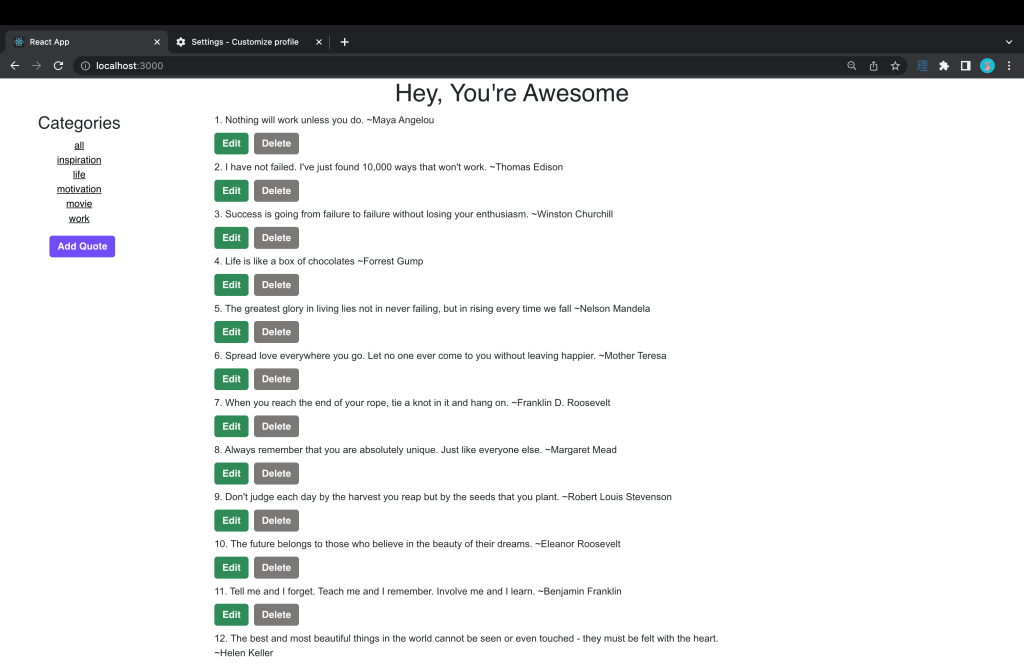
When I first started this project with a handful of quotes, having an edit and delete button underneath each quote seemed fine, but when the list grew long, it started to look a bit bloated.
With this in mind, I wanted to:
- create a slick way to bulk delete quotes
- remove the edit and delete buttons from underneath each quote
The below is what I came up with.
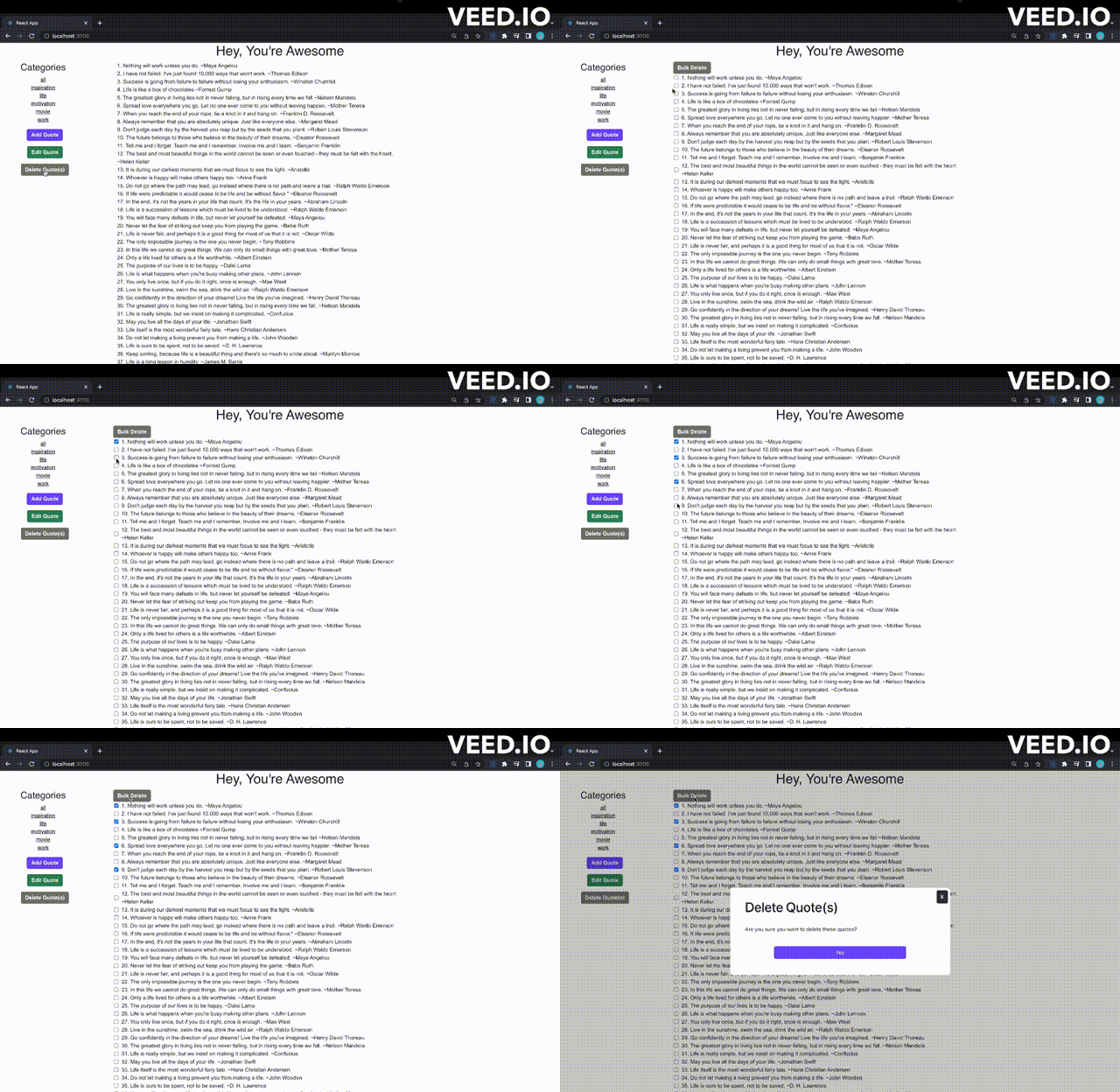
It’s nothing fancy. I put a single delete button to the left side, which toggles checkboxes. After at least one checkbox is clicked, the bulk delete button at the top of the list becomes clickable, allowing you to delete the selected quotes. Overall, it’s a cleaner visual solution.
I also moved the edit button to the side. Edit works nearly the same way, except it operates with radio buttons (because you can only edit one quote at a time).
Now that I have most of the minimum viable functionality working, I’m going to work on more front end presentation to make this look more visually appealing. My plan is to present these quotes in cards with atmospheric backgrounds.
Till next time.
-
Gimme an ‘S’!
The past week I’ve been busy traveling, but I also decided I’d try to play around with AWS. I signed up for a free account and followed some basic tutorials to figure out how to get things started (this one was mostly good for me). I ended up going with Lightsail on AWS because it “seemed” to be the most beginner friendly. At this point, I’ve managed to get this instance of WordPress hosted on AWS, but only have front-facing HTTP access. I’ve spent the past couple of days trying to get HTTPS access (hence the title!), but it’s been a bit of a struggle. There’s a ton of slightly different information out there because of varying project setup needs (it doesn’t help that Lightsail + related software are changing constantly either!).
In other news, I took the plunge yesterday and (re)started a premium subscription to leetcode so I could start tackling problems in python. For some background, when I was prepping for interviews a year and a half ago, I was using java as my interview language. I’ve heard that experienced programmers don’t like how verbose it is, but I appreciate its type safety and how explicit it is, as a beginner. I have a feeling that python will feel more elegant in the long run (no semicolons!?), but in my first few problems on leetcode, I’ve found myself scratching my head trying to figure out how to translate things from java to python. 七転び八起き.
-
11/14/2022
I haven’t written since I started the blog a couple of weeks ago. I’ve been trying to figure out what to write, how to get into a cadence of making updates more regularly.
I started a project recently to try and learn python. In general, over the past few weeks I’ve:
- Started python project, a command line calculator
- Researched python web servers, chose + implemented Tornado
- Wrote a version of the calculator instead with vanilla js
- Made updates to kotlin book keeper app (check mark display in search results if book is already in your library)
Where can I go from here? I’ve been thinking a lot about what to do, how to plot things out. I know I need depth in interview prep, knowledge of cloud concepts, and projects to make me feel confident, but the right mix and combination has been difficult to nail down.
Some next steps.
For the python calculator, I think I’m going to make some modifications to this calculator in vanilla js, potentially rewrite the js using react, and then figure out how to deploy the project on AWS.
For the kotlin app, I just finished a feature where I display a check mark on a book title thumbnail in search results if it’s already in your library. I think the next feature I want to add the ability to edit certain book information in the detail page.
I will try to post again on 11/16/2022!
-
Subscribe
Subscribed
Already have a WordPress.com account? Log in now.
 Wayne Codes